
New Features
- Import from Notion. Export your Notion workspace as Markdown & CSV, point Cozy at the folder, and your pages come in as journal entries — dates, titles, and tags along for the ride. Find it under File → Import, or on the opening screen when setting up a new journal.
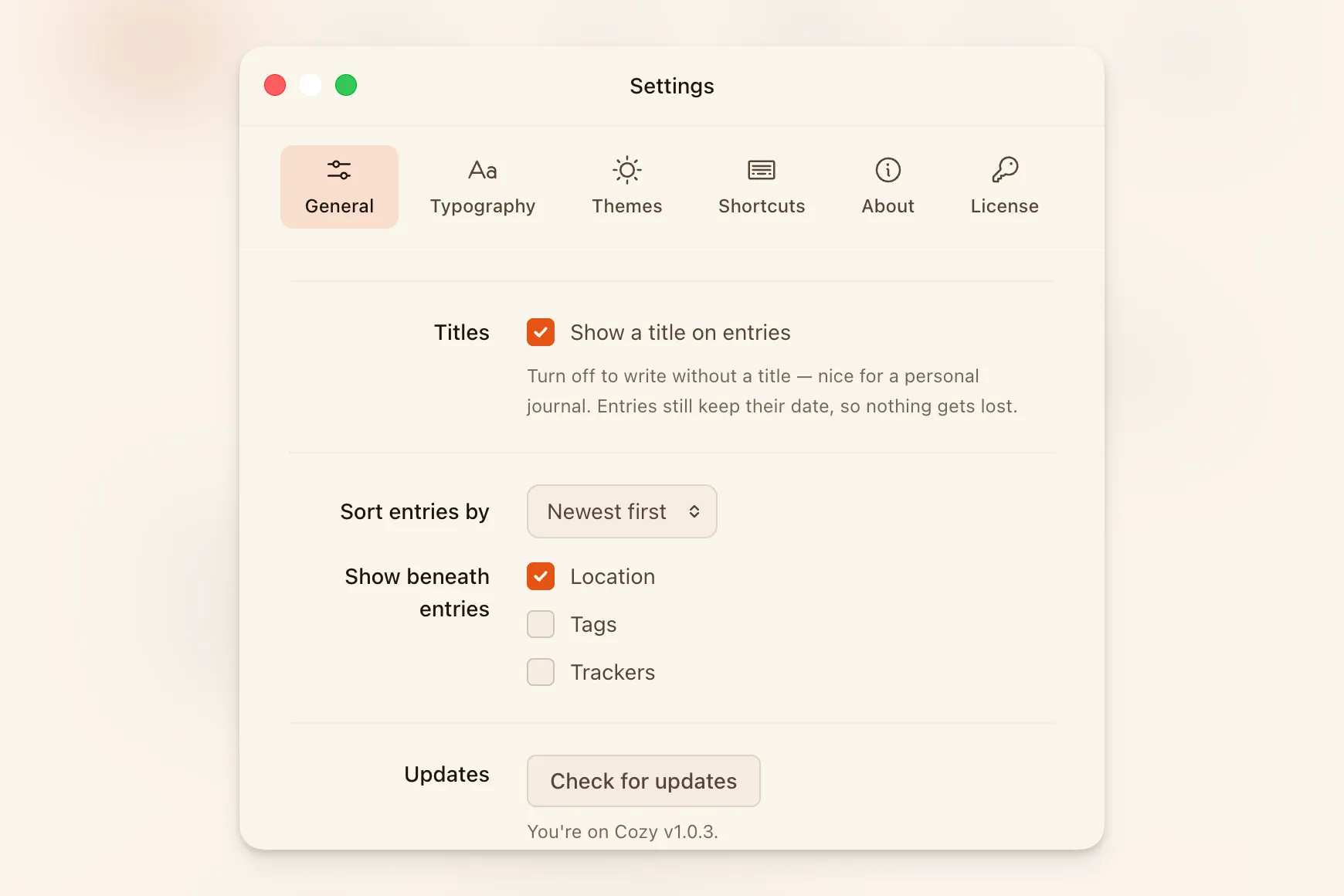
- Choose what shows beneath each entry. Settings now lets you pick whether an entry’s location, tags, trackers, or any mix of them appears below its title in the list. Location shows by default, as it always has; tags and trackers are there when you want them. Whatever you pick carries through the calendar, the map, and On This Day too.
- Your macOS text shortcuts now work in Cozy. Whatever you’ve set up in System Settings → Keyboard → Text Replacements — “omw” for “On my way!”, abbreviations, longer phrases — Cozy now expands them as you type. They fire on a space or punctuation mark and skip code blocks, so your abbreviations stay put where you’re writing code.
- Write without titles. There’s now an option in Settings to turn off the title line entirely. Entries just start — the date still shows in the toolbar, and your titles are kept quietly in each file, so turning it back on later doesn’t lose a thing.
Improvements
- The sidebar toggle button follows the rail. When the rail is open, the toggle sits at its right edge. Collapse the rail and it moves to the top-left corner beside the traffic lights — and disappears entirely in writing mode, where the rest of the chrome does too.
- The rail remembers its state across journals. Collapsing the rail in one journal used to snap it back open the moment you switched to another. Now it works like the panel widths — whatever you set, it stays.
- Cozy skips location detection when you’re offline. It used to spin for up to ten seconds trying to find your location with no connection. Now it bails immediately. On a slow connection, the whole lookup — position plus place name — has a three-second limit so the editor doesn’t wait on you.
- Entry previews show two lines instead of one. The snippet beneath each entry’s title in the sidebar used to collapse into a single truncated line. It now shows up to two and preserves paragraph breaks, so a quick scan tells you more about what’s inside.
Bug Fixes
- Search previews show only your words. An entry with an image used to show its raw image markup —
— in the search result preview. The preview now shows only the text you wrote. - Tags and tracker values stick after you save on cloud drives. If your journal lived in a synced folder — Google Drive, Dropbox, iCloud, OneDrive — a tag or tracker you added could flash in the sidebar and then quietly revert until you restarted. The sidebar now refreshes from the saved file the moment the write completes.